
2026年版 ThinkPad L450 (FreeBSD)をWaylandへ【LabwcでOpenboxっぽく】
今日は2026年09月21日。天気は(台風が接近していて)大荒れ。個人の翻訳事務所ヒノトリホンヤクの本店がある東京都日野市の最高気温は25℃の予想です。
今日のお題:Lenovo ThinkPad L450をWayland環境(実用レベル)に持ち込みました。 コンポジターはLabwcで、これはOpenboxとの互換性を重視しています。
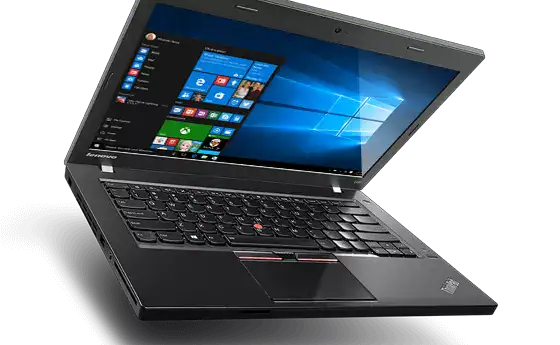
先月のブログエントリーにも書きましたが、実験台(テスト機体)になってくれたのは、Lenovo ThinkPad L450というラップトップです。CPUはCeleron。発売は2015年頃。たぶん製造からは10年経ってますね。
こんな外観です。
あきらめたこと
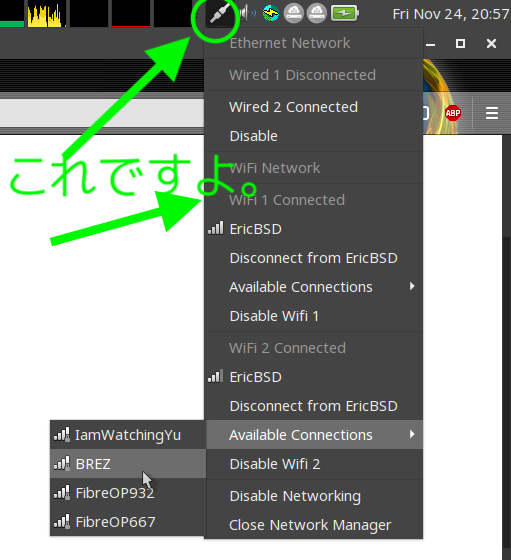
これがnetworkmgrです。
PipeWireは新しい低レベルマルチメディアフレームワークです。 映像と音声を最小の遅延で再生/キャプチャすることを目的としていて、PulseAudio、JACK、ALSA、GStreamer をベースとしたアプリケーションと互換性があります。このフレームワークのデーモンは (PulseAudio と JACK の機能を持った) オーディオサーバーとしても、ビデオキャプチャサーバーとしても設定できます。
* 但し、(5)の代替品への切り替えは、現時点ではWayland全般の制限事項です。Linuxだってみなさまが妥協しているポイントです。
FreeBSDに限ったことではない。
ここで、最新の環境を記録。まずは /etc/rc.conf (先月のブログエントリーと比べて変更はないはずです。X11とは別にWaylandをセットアップしたので)
###### /etc/rc.conf (2026-07-26 ThinkPad L450 FreeBSD 15.1-RELEASE Xfce)
#
##
hostname="tp-l450-bsd"
keymap="jp.capsctrl.kbd"
ifconfig_em0="DHCP"
ifconfig_em0_ipv6="inet6 accept_rtadv"
sshd_enable="YES"
ntpd_enable="YES"
powerd_enable="YES"
# Set dumpdev to "AUTO" to enable crash dumps, "NO" to disable
dumpdev="AUTO"
zfs_enable="YES"
# Added by auto-admin from desktop-installer
ntpdate_enable="YES"
# End auto-admin addition
# Added by auto-admin from desktop-installer
ntpdate_flags="-u pool.ntp.org"
# End auto-admin addition
# Added by auto-admin from desktop-installer
nfs_client_enable=YES
# End auto-admin addition
# Added by auto-admin from desktop-installer
rpc_statd_enable=YES
# End auto-admin addition
# Added by auto-admin from desktop-installer
rpc_lockd_enable=YES
# End auto-admin addition
# Added by auto-admin from /usr/local/sbin/auto-autofs-nfs-setup
autofs_enable=YES
# End auto-admin addition
# Added by auto-admin from desktop-installer
devd_enable=YES
# End auto-admin addition
# Added by auto-admin from desktop-installer
devfs_system_ruleset="system"
# End auto-admin addition
# Added by auto-admin from desktop-installer
dbus_enable=YES
# End auto-admin addition
kld_list="/boot/modules/i915kms.ko"
wlans_iwm0="wlan0"
ifconfig_wlan0="WPA DHCP"

### added by hinotori-honyaku, on 2026-07-25
dsbmd_enable="YES"
# sshd_enable="YES"
linux_enable="YES"
ubuntu_enable="YES"
#
次は /etc/sysctl.conf (これも、先月の – 2026-08時点 – ものと変更ないはずです)
###### /etc/sysctl.conf (2026-07-26 ThinkPad L450 FreeBSD 15.1-R Xfce)
###### ****vfs.usermount=1**** is important ######
#
#  This file is read when going to multi-user and its contents piped thru
#  ``sysctl'' to adjust kernel values.  ``man 5 sysctl.conf'' for details.
#

# Uncomment this to prevent users from seeing information about processes that
# are being run under another UID.
#security.bsd.see_other_uids=0
vfs.zfs.vdev.min_auto_ashift=12
# Added by auto-admin from /usr/local/sbin/auto-set-lid-switch-mode
hw.acpi.lid_switch_state=S5
# End auto-admin addition
# Added by auto-admin from desktop-installer
vfs.usermount=1
# End auto-admin addition
#
# vfs.usermount=1 は大切。
# 今回はdesktop-installerが
# 自動で設定してくれたけど。
続いて、/boot/loader.conf (これも先月 – 2026-08-31時点- から変更ないはずです)
最後のfuse_load=”YES” はだいじ。
###### /boot/loader.conf (2026-06-26 ThinkPad L450 FreeBSD 15.1-RELEASE Xfce)
###### the last line fuse_load="YES"
###### added by the user (hinotori-honyaku)

kern.geom.label.disk_ident.enable="0"
kern.geom.label.gptid.enable="0"
zfs_load="YES"
# Added by auto-admin from desktop-installer
uplcom_load="YES"
# End auto-admin addition
# Added by auto-admin from desktop-installer
ng_ubt_load="YES"
# End auto-admin addition
# Added by auto-admin from /usr/local/sbin/auto-detect-laptops
acpi_ibm_load="YES"
# End auto-admin addition
#

### Added by hinotori-honyaku on 2026-07-25
fuse_load="YES"
###
Labwcの設定ファイル。 ~/.config/labwc/rc.xml です。
このファイルは Labwcの公式Webサイトを読みながら、私が作りました。(Claudeに助けてもらったけど。)
<?xml version="1.0" ?>
<!-- このファイルは FreeBSDのLabwcの rc.xml -->
<!-- ~/.config/labwc/rc.xml -->
<!-- theme (Windowのテーマ) は Openbox用の1977-Openboxを -->
<!-- 流用。 69196-1977-openbox.obt を展開して、適切なディレクトリに配置。-->
<!-- keybind key="W-v"の部分は、wofiを利用したクリップボード -->
<!-- マネージャーの貼り付け(呼び出し)の代替手段。-->

<labwc_config>
        <desktops>
            <names>
                <name>WS 01</name>
                <name>WS 02</name>
            </names>
        </desktops>
        <keyboard>
            <default />
            <!-- W- refers to the Super/Win key -->
            <keybind key="W-r">
                <action name="Execute" command="wofi --show drun" />
            </keybind>
            <keybind key="W-v">
                <action name="Execute" command="sh -c 'cliphist list | wofi --dmenu | cliphist decode | wl-copy'"/>
            </keybind>
            <!-- ワークスペースの切り替え -->
            <keybind key="W-Left">
                <action name="GoToDesktop" to="left" wrap="yes" />
            </keybind>
            <keybind key="W-Right">
                <action name="GoToDesktop" to="right" wrap="yes" />
            </keybind>
        </keyboard>
        <libinput>
            <device category="touchpad">
                <naturalScroll>yes</naturalScroll>
            </device>
        </libinput>

        <theme>
            <name>1977-Blue</name>
            <CornerRadius>8</CornerRadius>
            <font name="Migu 1c" size="14" />
        </theme>

</labwc_config>
Labwcの設定ファイル。 ~/.config/labwc/autostart です。
このファイルは Labwcの公式Webサイトを読みながら、私が作りました。
#!/bin/sh
# this file is the "autostart" for Labwc.
# ~/.config/labwc/autostart
#
# PipeWire (start on each wayland session. not from rc.conf) on 2026-08-10 by user
# Giving up. PipeWire and OSS are not stable on FreeBSD 15.1 on 2026-08-17 by user
# pipewire &
# pipewire-pulse &
# wireplumber &

## wallpaper setting
# swaybg -i ~/Wallpapers/2001_A_Space_Odyssey_Shuttle_Orion_w_FreeBSD_Logo.jpg -m fill &
# swaybg -i /home/hogehoge/Wallpapers/000-2001.A.Space.Odyssey-Moon-Bus-Wallpaper.png -m fill &
# swaybg -i /home/hogehoge/Wallpapers/000-2001.A.Space.Odyssey-Moon-Bus-Wallpaper-02.png -m fill &
# swaybg -i /home/hogehoge/Wallpapers/000-American_Graffiti_Wallpaper.jpg -m fit &
# swaybg -i /home/hogehoge/Wallpapers/000-BladeRunner-Spinner-Wallpaper.jpg -m fill &
# swaybg -i /home/hogehoge/Wallpapers/000-FullMetal-Wallpaper.jpg &
swaybg -i /home/hogehoge/Wallpapers/AKIRA.png -m fit &

############################## bars (or panels)
sleep 1
# sfwbar -f /home/hogehoge/.config/sfwbar/sfwbar.config -c /home/hogehoge/.config/sfwbar/sfwbar.css &
sfwbar &
sleep 1
waybar &
#
# Fcitx5 start. written on 2026-08-10 by user
# sleep 2 sec. after waybar start.
sleep 2
fcitx5 -d &
# place items you want in the systray, here.
# networkmgr is not stable on wayland, freebsd. Giving up.
# 2026-09-03
# networkmgr &
# add dsbmc (auto-mount client) for the systray.
dsbmc -i &
## Clipboard Manager preparation (not for the systray)
wl-paste --watch cliphist store &
#
## add (sound) volume control for the systray.
dsbmixer -i &
#
Labwcの設定ファイル。 ~/.config/labwc/environment です。
このファイルは Labwcの公式Webサイトを読みながら、私が作りました。
### this file is
### Labwc config environment
### ~/.config/labwc/environment
### 2026-09-03 created by user.
XKB_DEFAULT_LAYOUT=jp
# GTK_IM_MODULE=fcitx
# QT_IM_MODULE=fcitx
XMODIFIERS=@im=fcitx
# SDL_IM_MODULE=fcitx
#
# GTK_IM - - -, QT_IM - - - , SDL_IM - - -
# lines are commented out by user
# because the system warned.
# looks like configuration is redundant.
アプリケーションランチャー(コマンド型)のwofiの設定ファイル。 ~/.config/wofi/style.cssです。
デフォルトのwofiは視認性がイマイチだったので、カスタマイズしました。 見た目が黄色になってしまったのが自分でも意外でしたが、もう眼が若くないので受け入れました。 wofiの見た目カスタマイズについては、AIのgeminiさんに手伝ってもらいました。このYouTubeビデオも役に立つかもしれません。 しかし、配色に関しては基礎知識がないので「やってみなければわからない」です。 自分の好みすらよくわかっていない。
我ながら残念だと思います。
* {
/* this file is style.css for wofi app launcher */
/* created by user, on 2026-09-03 */
/* ~/.config/wofi/style.css */
/* */
    font-family: Migu 1M; /* optional */
    font-size: 18px;	/* set your preferred size here */
}
window {
    margin: 10px; /* External margin around the entire launcher */
    background-color: #FFEE8C;
}

#outer-box {
    margin: 7px; /* spacing inside the window frame */
}

#inner-box {
    margin: 1px; /* Spacing for the entry list container */
}
スクリーンの一番上部においたパネル(Openboxで言えばtint2相当)、waybarの設定ファイル。 ~/.config/waybar/style.cssです。
多少はtint2っぽくない感じに、モダンに見た目を変えてみたくて苦労しました。(私も、AIのClaudeさんに教えてもらいました)
* {
/* this file is style.css for Waybar */
/* ~/.config/waybar/style.css */
    /* `otf-font-awesome` is required to be installed for icons */
    /* font-family: FontAwesome, Roboto, Helvetica, Arial, sans-serif; */
    font-family: "FiraCode Nerd Font";
    font-size: 16px;
    /* color: #ffffff; */
    color: #f5f5f5;
    font-weight: bold;
    text-shadow: 1px 1px 1px rgba(0,0,0,0.8);
}

window#waybar {
    /* background-color: rgba(43, 48, 59, 0.5); */
    background-color: rgba(255, 30, 30, 0.65);
    border-radius: 8px;
    /* border-bottom: 3px solid rgba(100, 114, 125, 0.5); */
    /* color: #ffffff; */
    /* transition-property: background-color; */
    /* transition-duration: .5s; */
}

#cpu, #memory, #tray, #clock, #workplaces {
    padding: 0 10px;
}

#workspaces button {
    padding: 0 6px;
}

#workspaces button.active {
    font-weight: bold;
}
続いて、~/.config/waybar/config.jsoncです。
// -*- mode: jsonc -*-
//
// this file is config.jsonc for FreeBSD Waybar
// ~/.config/waybar/config.jsonc
{
    // "layer": "top", // Waybar at top layer
    // "position": "bottom", // Waybar position (top|bottom|left|right)
    "layer": "top",
    "position": "top",
    "height": 30,
    "margin-top": 8,
    "margin-left": 12,
    "margin-right": 12,

    // "modules-left": ["wlr/workspaces"],
    "modules-left": [],
    "modules-center": [],
    "modules-right": ["cpu", "memory", "tray", "clock"],

    "wlr/workspaces": {
        "format": "{name}"
    },

    "cpu": {
        "format": "CPU {usage}%",
        "interval": 5
    },

    "memory": {
        "format": "RAM {percentage}%",
        "interval": 5
    },

    "tray": {
        "icon-size": 18,
        "spacing": 10
    },

    "clock": {
        "format": "{:%Y-%m-%d (%a) %H:%M}",
        "tooltip": false
    }
}
スクリーンの一番下部においたパネル、sfwbarの設定ファイル。 ~/.config/sfwbar/sfwbar.cssです。
PlankなDockがWaylandに未対応。 Wayland用のDockであるCrystal-DockはFreeBSD用のバイナリがまだ無いので、アイコンがズームするようなドックを諦めました。
Dock的に使える画面下パネルとして、sfwbarを提案されたのです。
/* This file is sfwbar.css for FreeBSD sfwbar (wayland) */
/* created by user on 2026-09-03*/
/* ~/.config/sfwbar/sfwbar.css */
/* */
window#dock {
    background-image: none;
    background-color: rgba(255, 30, 30, 0.70);
    border-radius: 8px;
}

button#launcher {
    margin: 4px 6px;
}
続いてsfwbarの設定ファイル。 ~/.config/sfwbar/sfwbar.config
#Api2
#
# this file is sfwbar.config for FreeBSD sfwbar
# created by user on 2026-09-03
# ~/.config/sfwbar/sfwbar.config
#
# IconTheme = "Flat-Remix-Teal-Light-darkPanel"
IconTheme = "fnm-violet"

bar "dock" {
    edge = bottom
    layer = top
    size = "95%"
    halign = center
    # margin = "0 0 16 0"
    margin = 6
    exclusive_zone = "0"

    # grid {
    #	-GtkWidget-visible = false;
    #}
    #button {
    #	style = "launcher"
    #	value = "pcmanfm"
    #	action[LeftClick] = Exec("pcmanfm")
    #}
    button {
        style = "launcher"
        value = "pcmanfm"
        action[LeftClick] = Exec("pcmanfm")
    }
    button {
        style = "launcher"
        value = "thunar"
        action[LeftClick] = Exec("thunar")
    }
    button {
        style = "launcher"
        value = "foot"
        action[LeftClick] = Exec("foot")
    }
    button {
        style = "launcher"
        value = "terminator"
        action[LeftClick] = Exec("terminator")
    }
    button {
        style = "launcher"
        value = "sakura"
        action[LeftClick] = Exec("sakura")
    }
    button {
        style = "launcher"
        value = "ghostty"
        action[LeftClick] = Exec("ghostty")
    }
    button {
        style = "launcher"
        value = "firefox"
        action[LeftClick] = Exec("firefox")
    }
    button {
        style = "launcher"
        value = "falkon"
        action[LeftClick] = Exec("falkon")
    }
    button {
        style = "launcher"
        value = "geany"
        action[LeftClick] = Exec("geany")
    }
    button {
        style = "launcher"
        value = "mousepad"
        action[LeftClick] = Exec("mousepad")
    }
    button {
        style = "launcher"
        value = "vlc"
        action[LeftClick] = Exec("vlc")
    }
    button {
        style = "launcher"
        value = "smplayer"
        action[LeftClick] = Exec("smplayer")
    }
    button {
        style = "launcher"
        value = "mpv"
        action[LeftClick] = Exec("mpv")
    }
    button {
        style = "launcher"
        value = "deadbeef"
        action[LeftClick] = Exec("deadbeef")
    }
    button {
        style = "launcher"
        value = "sayonara"
        action[LeftClick] = Exec("sayonara")
    }
    button {
        style = "launcher"
        value = "viewnior"
        action[LeftClick] = Exec("viewnior")
    }
    button {
        style = "launcher"
        value = "grsync"
        action[LeftClick] = Exec("grsync")
    }
#	button {
#		style = "launcher"
#		value = "filezilla"
#		action[LeftClick] = Exec("filezilla")
#	}
    button {
        style = "launcher"
        value = "xpad"
        action[LeftClick] = Exec("xpad")
    }
    button {
        style = "launcher"
        value = "zim"
        action[LeftClick] = Exec("zim")
    }
    button {
        style = "launcher"
        value = "gnote"
        action[LeftClick] = Exec("gnote")
    }

    taskbar {
        icons = true
        labels = true
        sort = true
    }
    button {
        style = "launcher"
        value = "pcmanfm"
        action[LeftClick] = Exec("pcmanfm")
    }
}
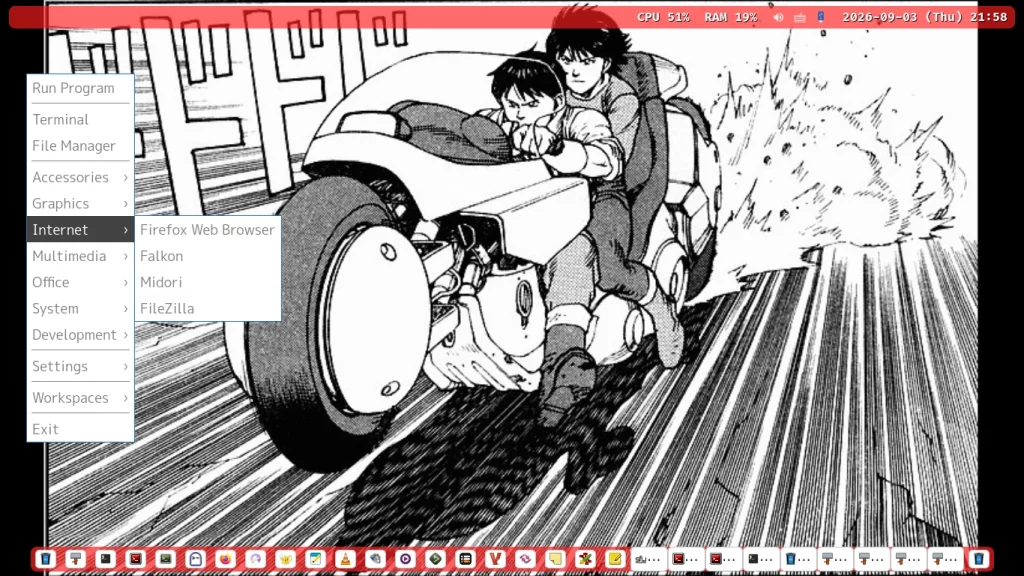
Labwcのroot menuです。 Openboxの右クリックから出るメニューと互換性があります。 ~/.config/labwc/menu.xmlです。
けっこう苦労しました。 (X11なOpenboxのメニュージェネレータ自体が、入れ替わりが激しくて選択に困る状態だからです。それがWaylandとLabwcになるとさらに厄介でした。そうでなくてもFreeBSDだし)
<?xml version="1.0" encoding="UTF-8"?>
<!-- このファイルはLabwcのroot menu いわゆる右クリックメニュー -->
<!-- の設定ファイル。 labwc-menu-generatorを使用して生成させた。-->
<!-- https://github.com/labwc/labwc-menu-generator -->
<!-- 色々カスタマイズするとやっかいなので、日本語化していない。 -->
<!-- 色々カスタマイズするとやっかいなので、アプリケーションのアイコンも表示しない。 -->
<!-- 動的なメニューにもしていない。 新しいアプリケーションをインストールしたら -->
<!-- 自力で手動でmenu.xmlを編集すること。 -->
<!-- このファイルは ~/.config/labwc/menu.xml -->
<openbox_menu>
<menu id="root-menu" label="root-menu">
  <item label="Run Program">
      <action name="Execute">
          <command>wofi --show drun</command>
      </action>
  </item>
  <separator />
  <item label="Terminal">
      <action name="Execute">
      <command>foot</command>
      </action>
  </item>
  <item label="File Manager">
      <action name="Execute"><command>pcmanfm</command></action>
  </item>
  <separator />
  <menu id="Accessories" label="Accessories">
    <item label="File Manager PCManFM">
      <action name="Execute"><command>pcmanfm</command></action>
    </item>
    <item label="Thunar File Manager">
      <action name="Execute"><command>thunar</command></action>
    </item>
    <item label="Double Commander">
      <action name="Execute"><command>doublecmd</command></action>
    </item>
    <item label="Midnight Commander">
      <action name="Execute"><command>mc</command></action>
    </item>
    <item label="File Manager">
      <action name="Execute"><command>exo-open --launch FileManager</command></action>
    </item>
    <item label="Fcitx 5">
      <action name="Execute"><command>/usr/local/bin/fcitx5</command></action>
    </item>
    <item label="Xpad">
      <action name="Execute"><command>xpad</command></action>
    </item>
    <item label="Zim Desktop Wiki">
      <action name="Execute"><command>zim</command></action>
    </item>
    <item label="Gnote">
      <action name="Execute"><command>gnote</command></action>
    </item>
    <item label="Geany">
      <action name="Execute"><command>geany</command></action>
    </item>
    <item label="Mousepad">
      <action name="Execute"><command>mousepad</command></action>
    </item>
    <item label="Terminator">
      <action name="Execute"><command>terminator</command></action>
    </item>
    <item label="Sakura">
      <action name="Execute"><command>sakura</command></action>
    </item>
    <item label="Ghostty">
        <action name="Execute"><command>/usr/local/bin/ghostty</command></action>
    </item>
    <item label="Terminal Emulator">
      <action name="Execute"><command>exo-open --launch TerminalEmulator</command></action>
    </item>
    <item label="Xarchiver">
      <action name="Execute"><command>xarchiver</command></action>
    </item>
    <item label="Keyboard layout viewer">
      <action name="Execute"><command>kbd-layout-viewer5</command></action>
    </item>
  </menu> <!-- Accessories -->
  <menu id="Graphics" label="Graphics">
    <item label="Viewnior">
      <action name="Execute"><command>viewnior</command></action>
    </item>
    <item label="ePDFViewer">
      <action name="Execute"><command>epdfview</command></action>
    </item>
    <item label="LibreOffice Draw">
      <action name="Execute"><command>libreoffice --draw</command></action>
    </item>
  </menu> <!-- Graphics -->
  <menu id="Internet" label="Internet">
    <item label="Firefox Web Browser">
      <action name="Execute"><command>firefox</command></action>
    </item>
    <item label="Falkon">
      <action name="Execute"><command>falkon</command></action>
    </item>
    <item label="Midori">
      <action name="Execute"><command>midori</command></action>
    </item>
    <item label="FileZilla">
      <action name="Execute"><command>filezilla</command></action>
    </item>
  </menu> <!-- Internet -->
  <menu id="Multimedia" label="Multimedia">
    <item label="DeaDBeeF">
      <action name="Execute"><command>deadbeef</command></action>
    </item>
    <item label="Sayonara">
      <action name="Execute"><command>sayonara</command></action>
    </item>
    <item label="SMPlayer">
      <action name="Execute"><command>smplayer</command></action>
    </item>
    <item label="VLC media player">
      <action name="Execute"><command>/usr/local/bin/vlc --started-from-file</command></action>
    </item>
    <item label="mpv Media Player">
      <action name="Execute"><command>mpv --player-operation-mode=pseudo-gui --</command></action>
    </item>
    <item label="DSBMixer">
      <action name="Execute"><command>dsbmixer</command></action>
    </item>
  </menu> <!-- Multimedia -->
  <menu id="Office" label="Office">
    <item label="ePDFViewer">
      <action name="Execute"><command>epdfview</command></action>
    </item>
    <item label="LibreOffice">
      <action name="Execute"><command>libreoffice</command></action>
    </item>
    <item label="LibreOffice Base">
      <action name="Execute"><command>libreoffice --base</command></action>
    </item>
    <item label="LibreOffice Calc">
      <action name="Execute"><command>libreoffice --calc</command></action>
    </item>
    <item label="LibreOffice Draw">
      <action name="Execute"><command>libreoffice --draw</command></action>
    </item>
    <item label="LibreOffice Impress">
      <action name="Execute"><command>libreoffice --impress</command></action>
    </item>
    <item label="LibreOffice Math">
      <action name="Execute"><command>libreoffice --math</command></action>
    </item>
    <item label="LibreOffice Writer">
      <action name="Execute"><command>libreoffice --writer</command></action>
    </item>
  </menu> <!-- Office -->
  <menu id="System" label="System">
    <item label="btop++">
      <action name="Execute"><command>btop</command></action>
    </item>
    <item label="DSBMC">
      <action name="Execute"><command>dsbmc</command></action>
    </item>
    <item label="Fcitx 5">
      <action name="Execute"><command>/usr/local/bin/fcitx5</command></action>
    </item>
    <item label="File Manager PCManFM">
      <action name="Execute"><command>pcmanfm</command></action>
    </item>
    <item label="Thunar File Manager">
      <action name="Execute"><command>thunar</command></action>
    </item>
    <item label="Midnight Commander">
      <action name="Execute"><command>mc</command></action>
    </item>
    <item label="ranger">
      <action name="Execute"><command>ranger-3.12</command></action>
    </item>
    <item label="Foot">
      <action name="Execute"><command>foot</command></action>
    </item>
    <item label="Foot Client">
      <action name="Execute"><command>footclient</command></action>
    </item>
    <item label="Foot Server">
      <action name="Execute"><command>foot --server</command></action>
    </item>
    <item label="Grsync">
      <action name="Execute"><command>/usr/local/bin/grsync -i</command></action>
    </item>
    <item label="Htop">
      <action name="Execute"><command>htop</command></action>
    </item>
    <item label="Sakura">
      <action name="Execute"><command>sakura</command></action>
    </item>
    <item label="Terminator">
      <action name="Execute"><command>terminator</command></action>
    </item>
    <item label="Ghostty">
        <action name="Execute"><command>/usr/local/bin/ghostty</command></action>
    </item>
    <item label="VTE Terminal for GTK3">
      <action name="Execute"><command>vte-2.91</command></action>
    </item>
    <item label="VTE Terminal for GTK4">
      <action name="Execute"><command>vte-2.91-gtk4</command></action>
    </item>
    <item label="Xfce Terminal">
      <action name="Execute"><command>xfce4-terminal</command></action>
    </item>
    <item label="XTerm">
      <action name="Execute"><command>xterm</command></action>
    </item>
  </menu> <!-- System -->
  <menu id="Development" label="Development">
    <item label="Geany">
      <action name="Execute"><command>geany</command></action>
    </item>
    <item label="GTK Demo">
      <action name="Execute"><command>gtk4-demo</command></action>
    </item>
    <item label="Node Editor">
      <action name="Execute"><command>gtk4-node-editor</command></action>
    </item>
    <item label="Print Editor">
      <action name="Execute"><command>gtk4-print-editor</command></action>
    </item>
    <item label="Qt 5 Assistant">
      <action name="Execute"><command>/usr/local/lib/qt5/bin/assistant</command></action>
    </item>
    <item label="Qt 5 Linguist">
      <action name="Execute"><command>/usr/local/lib/qt5/bin/linguist</command></action>
    </item>
    <item label="Qt Assistant">
      <action name="Execute"><command>assistant6</command></action>
    </item>
    <item label="Qt D-Bus Viewer">
      <action name="Execute"><command>qdbusviewer6</command></action>
    </item>
    <item label="Qt Linguist">
      <action name="Execute"><command>linguist6</command></action>
    </item>
    <item label="Qt Widgets Designer">
      <action name="Execute"><command>designer6</command></action>
    </item>
    <item label="Widget Factory">
      <action name="Execute"><command>gtk4-widget-factory</command></action>
    </item>
  </menu> <!-- Development -->
<separator />
  <menu id="Settings" label="Settings">
    <item label="Fcitx 5 Configuration">
      <action name="Execute"><command>/usr/local/bin/fcitx5-configtool</command></action>
    </item>
    <item label="Fcitx 5 Migration Wizard">
      <action name="Execute"><command>fcitx5-migrator</command></action>
    </item>
    <item label="GTK Settings">
      <action name="Execute"><command>nwg-look</command></action>
    </item>
    <item label="Thunar Preferences">
      <action name="Execute"><command>thunar-settings</command></action>
    </item>
  </menu> <!-- Settings -->
  <separator />

  <menu id="workspace-menu" label="Workspaces">
    <item label="WS 01">
        <action name="GoToDesktop" to="WS 01" />
    </item>
  	<item label="WS 02">
        <action name="GoToDesktop" to="WS 02" />
    </item>
  </menu>

  <separator />

  <item label="Exit">
    <action name="Exit" />
  </item>

</menu> <!-- root-menu -->
</openbox_menu>
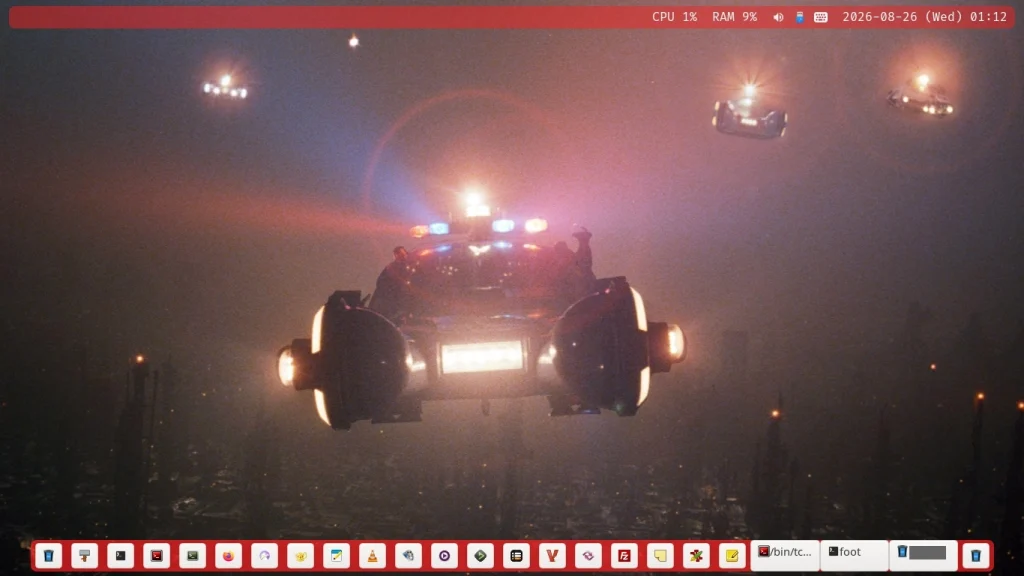
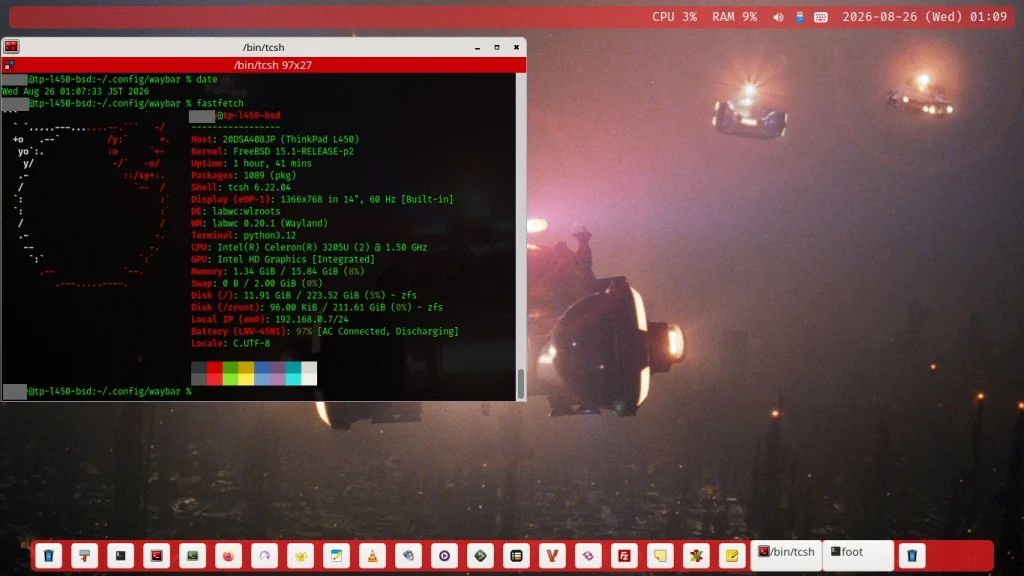
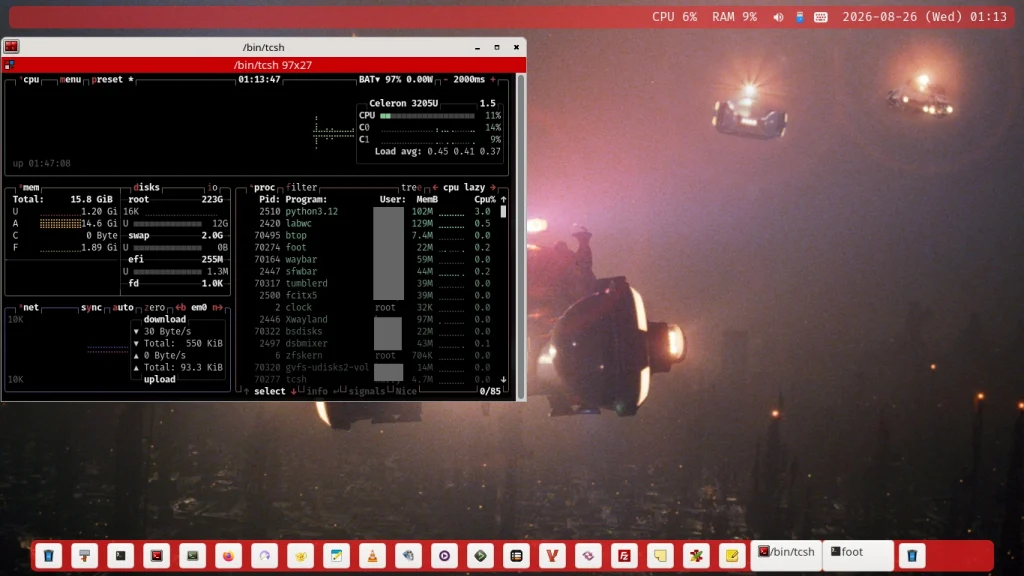
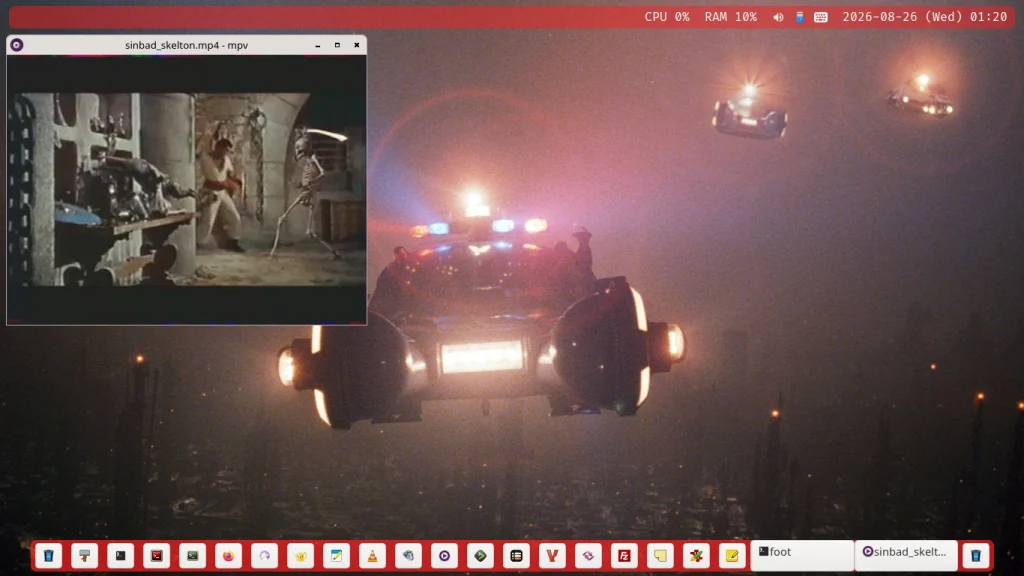
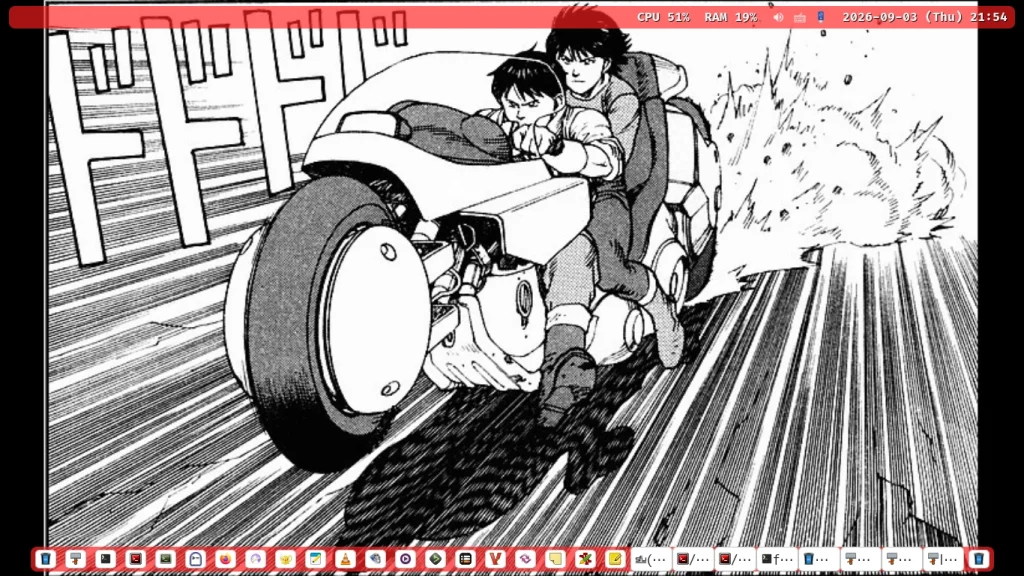
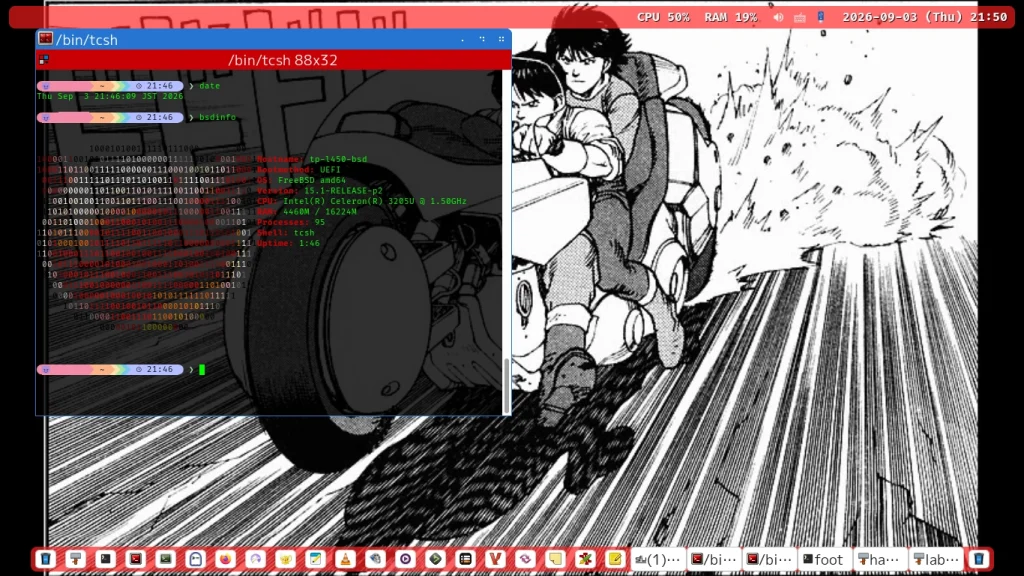
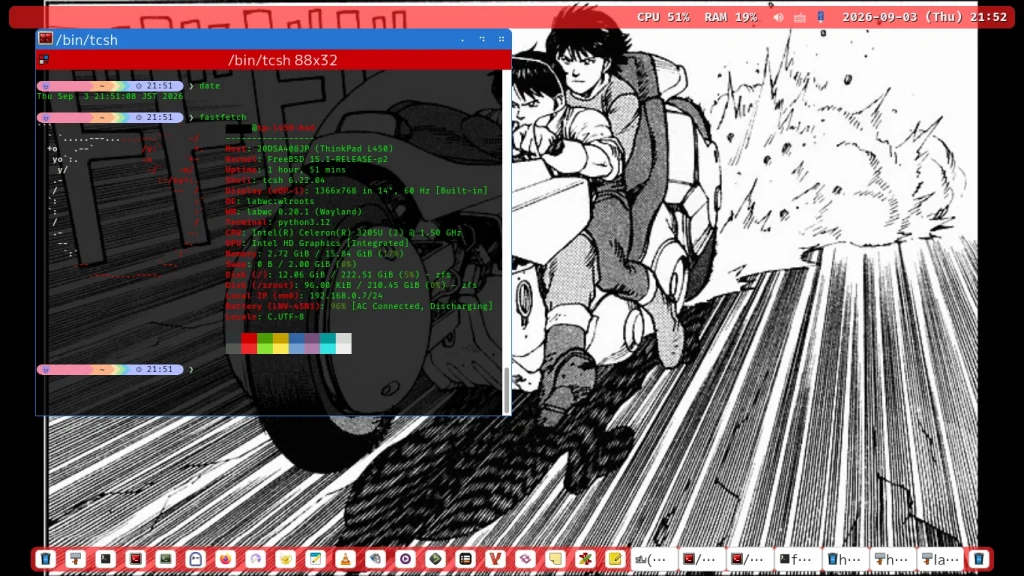
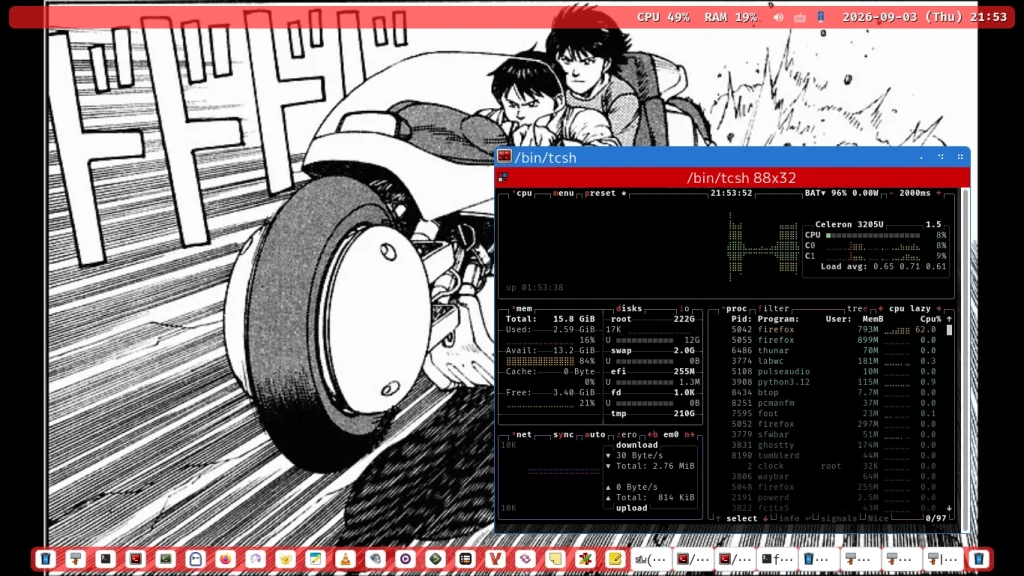
それでは出来上がったFreeBSD 15.1-RELEASE + Labwc (Wayland)環境のスクリーンショット見せびらかしタイムです。
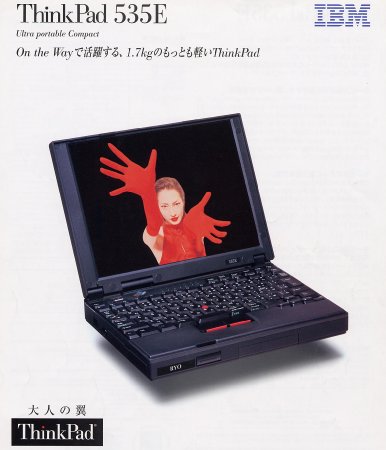
大事なことなのでまたまた言いますが、ThinkPad、IBMの時代はかっこよかったなぁ。(もう3回目???)

このラップトップPC Lenovo ThinkPad L450に関連するブログエントリーはこちら。